

How to Install My-Tivi App on Amazon Fire Stick
In this guide, we’ll walk you through the complete steps to install the My-Tivi IPTV app on your Amazon Fire Stick using the Downloader app. This method works on all Fire Stick models including Fire TV Stick Lite, Fire TV Stick 4K, and Fire TV Cube.
Step 1: Install the Downloader App
- From your Fire Stick Home Screen, navigate to the Search icon (magnifying glass) at the top.
- Type “Downloader” using the on-screen keyboard.
- Select the Downloader app by AFTVnews (it has an orange icon).
- Click Download or Get to install it.
- Wait for the installation to complete.
Step 2: Enable Developer Options on Fire Stick
You need to allow apps from unknown sources before you can install My-Tivi.
- Go to Settings from the Fire Stick home screen (gear icon on the far right).
- Select My Fire TV (or Device on older models).
- Note: Usually developer options is hidden by default try pressing on about multiple times until developer options shows up.
- Select Developer Options.
- Turn on Install Unknown Apps (or Apps from Unknown Sources).
- If you see a list of apps, find Downloader and toggle it ON.
Note: If you don’t see Developer Options, go to Settings > My Fire TV > About and click on your device name 7 times to unlock Developer Options.
Step 3: Download My-Tivi App
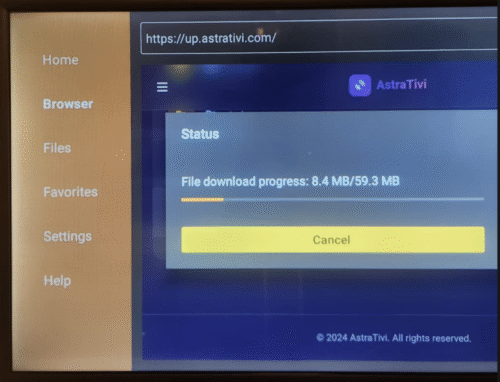
- Open the Downloader app on your Fire Stick.
- In the URL field, type: up.astrativi.com
- Press Go.
- The AstraTivi Downloads page will open in the Downloader browser.
- Navigate to the file list and click on my-tivi.apk to start the download.
- Wait for the download to complete.
Step 4: Install My-Tivi App
- Once the download finishes, a prompt will appear asking you to install the app.
- Click Install.
- Wait for the installation to complete.
- Click Done to finish (or Open to launch the app immediately).
- You can delete the downloaded APK file when prompted to save storage space.
Step 5: Log In to My-Tivi
- Open the My-Tivi app from your Fire Stick apps list.
- Enter your Username and Password provided with your AstraTivi subscription.
- Click Login.
- Enjoy your channels and content!
Troubleshooting Tips
- If the download doesn’t start, make sure you have Developer Options enabled and Downloader is allowed to install unknown apps.
- If you can’t find Developer Options, remember to click your device name 7 times under Settings > My Fire TV > About.
- Make sure your Fire Stick is connected to the internet.
- If you don’t have login credentials, visit my.astrativi.com to manage your subscription.
That’s it! You now have My-Tivi installed on your Fire Stick. If you need further help, contact our support team via WhatsApp or Telegram.